AuthEngine — Custom Login Framework
Designed a configuration-driven authentication framework for Sharpsell.ai that reduced per-client login setup from 7 days to minutes, eliminated engineering dependency, and decoupled revenue growth from headcount.
AuthEngine is a configuration-driven login framework I designed for Sharpsell.ai — an enterprise sales enablement platform serving India's banking and insurance sector. I was the sole designer, working directly with the PM and engineering across every layer: from stakeholder mapping and system diagnosis to object modelling, state design, and detailed UI.
The Problem
Sharpsell's enterprise revenue was growing — but login was quietly eating it alive.- Every Tier-1 client needed bespoke authentication — different credential types, multi-role hierarchies, strict compliance requirements. No two clients logged in the same way.
- Login alone consumed ~50% of the total onboarding timeline
- Revenue growth was linearly tied to engineering headcount — the worst scaling model for any SaaS business
- Nobody was wrong. Sales promised flexibility. Engineering pushed back on custom work. The system forced human negotiation where product rules should have existed.
| Metric | Before |
|---|---|
| Go-Live delay per client | ~14 days (login alone) |
| Engineering hours per quarter | 600+ rebuilding the same flows |
| Clients needing bespoke auth | 100% |
| Login as % of onboarding timeline | ~50% |
The Diagnosis
Before designing anything, I ran a quantitative audit across Tier-1 clients:
- KLI — 6 distinct user types: Employees (Password) + External Partners (Mobile OTP). Two separate auth pipelines.
- ABSLI — Three methods on one screen: ABSLI ID + Bank ID + Email OTP coexisting.
- LIC — Simple UI, complex backend: Single OTP screen, 3 distinct user_type payloads.
The problem wasn't the login screen. It was the absence of a system capable of duplication and reconfiguration.
Root Cause — The 5 Whys
| Why? | Because |
|---|---|
| Why did onboarding take ~14 days? | Login requirements weren't supported out of the box |
| Why weren't they supported? | Authentication logic was hard-coded into the product |
| Why was it hard-coded? | The system assumed one user persona per client |
| Why does that break? | Enterprise clients require multiple distinct roles within one app |
| Root Cause | A service-led model creates a linear dependency on engineering headcount that can't scale |
The Insight
Login logic lives in code instead of configuration.Once login was treated as a system orchestration problem — not a UI problem — variability became manageable, duplication became safe, and guardrails became designable.
How It Works
Three Core Objects
Rather than treating login as a page, I modelled it as reusable objects with clear, independent responsibilities:
- Login Module — A reusable interaction shell: how a user identifies themselves (Email, Phone, External ID). Can be duplicated up to 5 times per client.
- Auth Method — The validation rule that grants access (OTP, Password, Guest). Swappable without touching the module. Same identifier can authenticate differently per client.
- Reference Variable — Unique backend ID for each duplicated module (phone_agent, phone_manager). Prevents duplicated UI from becoming indistinguishable to the backend.
"Module defines interaction. Auth Method defines validation. Reference Variable defines identity."
Login Module
A reusable interaction shell — how a user identifies themselves. Duplicable up to 5 times per client.
Auth Method
The validation rule that grants access. Swappable without touching the module — no UI or code branching.
Reference Variable
Unique backend ID for each duplicated module. Prevents duplicated UI from becoming indistinguishable to the backend.
Three Login States
- Default — One module marked as primary. User lands directly on it. Handles single-persona clients.
- Role Selection — No default set. User sees all modules as collapsed tiles, picks their role. For multi-role orgs.
- Guest / Conditional — User not found in system. Decision tree routes to manual signup, external API validation, or hard stop.
Single-persona clients. No decision needed — the default module expands automatically on arrival.
email.
Twin-View Framework
Admin configuration on the left, exact runtime output on the right. Every toggle shows cause and effect together, before publish. Guardrails prevent invalid configurations — a 6th duplication attempt is blocked with a tooltip, not discovered in production.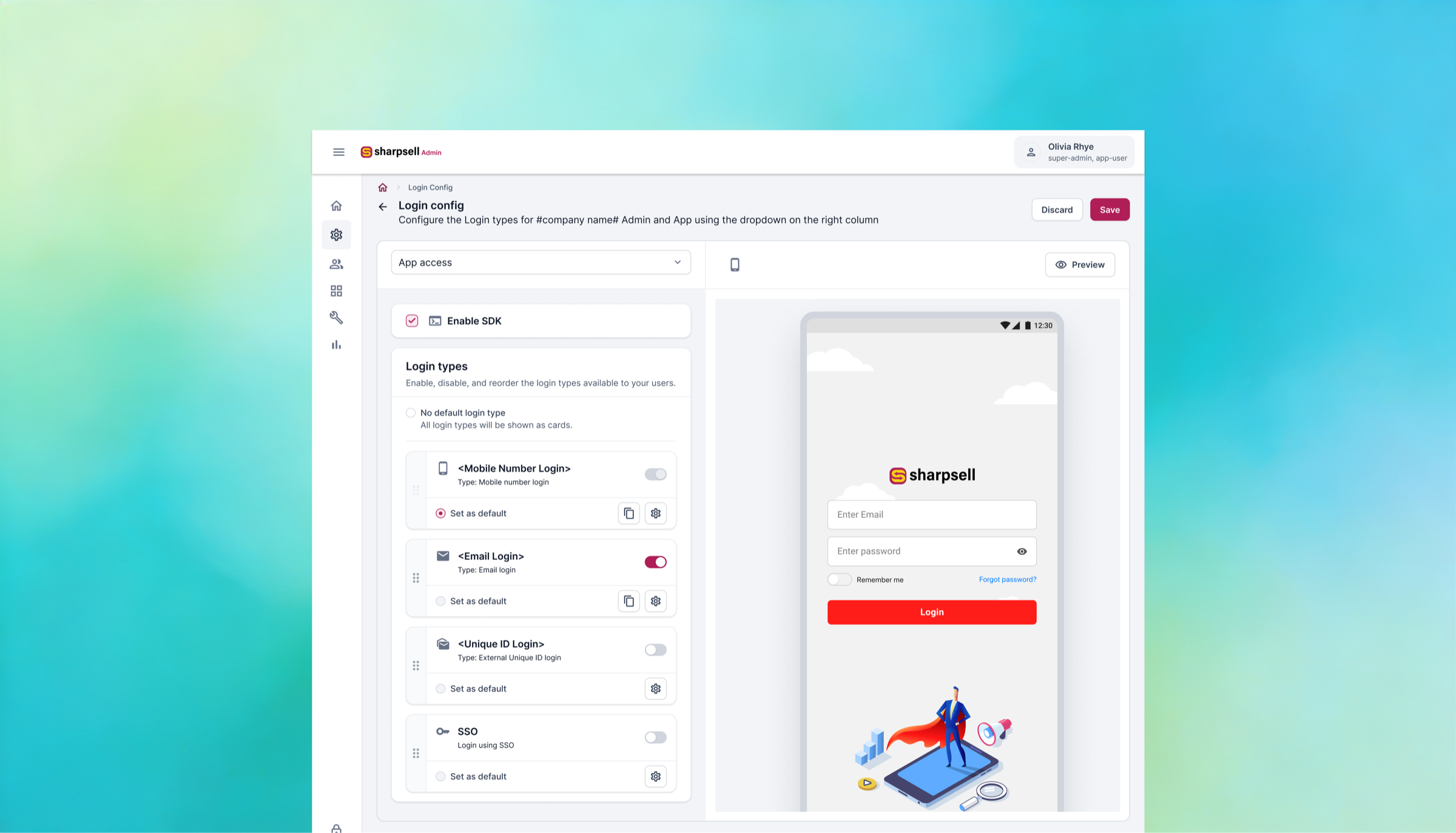
Guardrails
- 6th duplication attempted → Button disabled + tooltip
- Attempt to delete default module → Action blocked + error toast
- Invalid reference variable → Inline validation before save
- Conflicting auth methods → Publish blocked
Impact
| Metric | Before | After |
|---|---|---|
| Login setup time | ~7 days | Minutes (config only) |
| Engineering dependency | Mandatory per deal | Eliminated for standard cases |
| Engineering hours saved | — | 80%+ per deal |
| Go-Live delay from login | ~14 days | Near zero |
| Login discovery per client | 1-2 weeks | Eliminated |
- Success Managers now configure multi-role login without engineering support
- Zero production-breaking configs during entire pilot
- Engineering signed off as buildable, maintainable, and safe at scale — without any backend modification
- Role confusion dropped sharply during Day-1 adoption
The goal was never total elimination of complexity. It was containment and predictability — a system that handles 80% of cases without engineering, and routes the remaining 20% appropriately.
Per Deal
Standard Onboard
Config Alone
What I Learned
Map the system before you touch the screen. I spent weeks on stakeholder mapping, object modelling, and state logic before opening Figma — and that's exactly why it worked. The instinct to jump into UI is strong, especially under pressure to show progress. But in enterprise SaaS, the real design happens at the system layer.The 5 Whys didn't point to a screen problem. They pointed to an operating model problem. If I'd started with wireframes, I would have redesigned a login page. Instead, I redesigned how login works — and the screens fell into place because the underlying model was right.
AuthEngine didn't make login look better. It made growth possible — without adding headcount to do it.